View Our Holiday Operating Hours

Trimble SiteVision

Augmented Reality for Visualising Construction

Imagine being able to see what’s hidden or hasn’t been built yet. With Trimble® SiteVision™, you can bring geospatial data to life, visualising designs, underground utilities and complex information with precision and real-world context, all through your mobile device and the Trimble Cloud.
Provide Real-World Context to Your Design

communication icon

Visualise in 3D

Place and view georeferenced 3D models from any angle at true-to-life scale-above or below the ground.

mountains icon

Collaborate

Share, communicate, and collectively interact in real time with easy-to-understand visualisations.

chart icon

Report

Take photos, measurements and notes in the field; create tasks and assign them to team members.

chart icon

Measure

Measure positions using GNSS, Electronic Distance Measurement and AR to better understand your data on site.

Using AR technology, the client and stakeholders were able to walk through a full-scale 1-to-1 model of the

 space, experiencing the layout before construction begins.

This immersive approach allows the team to see how the space will function in reality, helping identify valuable insights, and refinements before construction begins.

Rohrig Constructions

See SiteVision in Action

Trimble® SiteVision™ is an augmented reality system that lets you visualise 3D models, designs and spatial data in the real world. Using your mobile device, you can see exactly how projects will look once built, identify what’s underground or behind walls, and make faster, more informed decisions directly on site.

Hardware

Trimble® SiteVision™ combines high-accuracy positioning and measurement tools in one portable system. Featuring centimetre-level GNSS accuracy powered by Trimble Catalyst and EDM capability using iOS LiDAR devices, it works seamlessly with both iOS and Android phones or tablets. Lightweight and versatile, it’s designed for handheld use or mounting on a range pole for added precision.

Trimble HPS2 GNSS system

Integration Ecosystem

Works Seamlessly With:

Trimble Connect

Manage and publish models to the field.

SketchUp

Visualise models in real-world scale, communicate design intent.

Tekla

Bring constructible models into SiteVision to verify fit, alignment, and coordination on site.

Trimble Access, Catalyst, and GNSS Solutions

Combine with your existing Trimble workflows.

APPLICATIONS

Trimble SiteVision is already at work in your industry:

SiteVision users

Client Engagement

Simplify explaining to clients by letting them see proposed designs, in situ using Augmented Reality. Allow the clients to walk around the proposed design and understand the details from different viewing angles in the context of the site. Share and discuss proposed design and design changes.

Civil road model SiteVision users

Planning

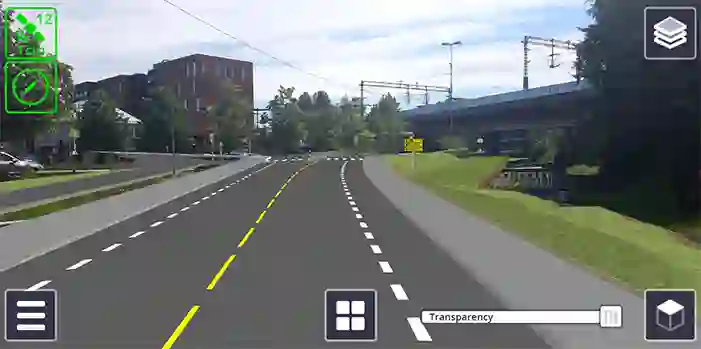
How will my planned road affect the surrounding environment? Use SiteVision to visualise design, the cut and fill values and how it will affect the surrounding environment.

SiteVision Model

Inspection

What is the progress of construction on site? Use SiteVision to visualise work planned, undertake inspections and work completed on a ‘Stakeless Site’.

SiteVision Model

Subsurface Utilities

Where is the existing infrastructure that I can’t see? Use SiteVision to utilise sub surface mapping information to visualise the location, size and attributes of underground infrastructure such as water, power, gas and telecommunications.

3D Visual in SiteVision

Electrical Utilities

View the visual impact of proposed designs. SiteVision allows you to provide better context on proposed changes during the public consultation phase, improving public understanding. Communicate with contractors the intended outcome and logistics associated with the construction phase.

Visualisation in SiteVision

Cadastral Boundaries

How can I communicate land rights and restrictions? Use SiteVision as a tool to visualise cadastral boundaries, identify survey monuments, plan surveys and communicate complicated land rights and restrictions.

Structures in SiteVision

Structures

What will new construction look like against existing? Use SiteVision to visualise above ground structures and infrastructure such as intersections, bridges, tunnels and buildings.

Visualisation in SiteVision

Real Estate Development

Communicate the design on site with city and regional authorities to speed up the planning approval. Show potential buyers what the future site will look like, as well as views from individual lots. Show proposed house designs on site.

Landscape architecture visualisation in SiteVision

Landscape Architecture

How will my design fit the existing environment? Use SiteVision to visualise landscape designs and features in an existing environment.

How SiteVision Works

  1. Upload – Publish your models from Trimble Connect, SketchUp, or other supported formats.
  2. Visualise – Use your phone or tablet with the SiteVision system to overlay models in the real world.
  3. Collaborate – Capture measurements, markups and tasks, and share updates instantly via the cloud.

Key Features: Trimble SiteVision

High-accuracy GNSS positioning

True-to-scale 3D model visualisation

Underground utility and design overlay

Real-time measurement and reporting

Cloud connectivity with Trimble Connect

Want to know more about Trimble Connect? Talk to our team.

Fill out the form below to get in contact with one of our sales experts. You can also contact us at 1800 900 272.

Tech Support: If you are looking for Product Tech Support please DO NOT use this form. Please visit our Support Page to contact us for support questions.

Give us a call

Australia

1800 900 272

Office hours: 8am-5.00pm AEST

Weekends: Closed

Fast Response Time

One of our specialists will contact you within 1 business day.

Professional Advice

Advice from experienced professionals.

Experienced Team

Work with a team that understands your project needs.