BuildingPoint’s SPACE GASS to IDEA StatiCa Checkbot Webinar
Hosted by Bao-Lam Dao and Nick van der Kreek at BuildingPoint Australia.

Hosted by Bao-Lam Dao and Nick van der Kreek at BuildingPoint Australia.
Nick van der Kreek and Bao-Lam Dao recently hosted a webinar on the SPACE GASS to IDEA StatiCa Checkbot link. The session demonstrated a workflow that allows engineers to take data directly from a global model in SPACE GASS into detailed steel connection design and code checks in IDEA StatiCa. The webinar attracted over 600 registrations, reflecting strong interest from the engineering community.
The SPACE GASS to IDEA StatiCa workflow allows engineers to import connections, loads, and load combinations from their structural analysis model into Checkbot. From there, connections can be analysed, designed, and verified to relevant standards such as AS 4100.
By linking the global model and connection design environment, engineers can maintain data consistency across the design process while significantly reducing manual rework.
A big shoutout goes to the SPACE GASS and IDEA StatiCa teams who worked closely together to deliver and continue improving this integration.
During the webinar, attendees saw a practical walkthrough of how the Checkbot workflow works in real projects. Some of the main highlights included:
Persistent Checkbot folders: A new export option allows Checkbot data to be stored in a separate persistent folder, rather than inside the SPACE GASS file. This improves project management, allows easier backups, and makes large models more manageable.
Design groups and templates: Checkbot automatically groups similar connections together. Engineers can create a parent connection template and apply it to multiple similar connections, enabling group calculations and faster setup across a project.
Optimised workflows: Practical tips were shared on filtering load combinations, merging members, and using offsets to improve analysis speed and accuracy.
Code checks and reporting: Connections can be analysed to AS 4100, with detailed checks for bolts, welds, plates, and buckling load factors. Engineers can generate clear, structured reports directly from Checkbot.
Synchronisation: If the structural model changes, Checkbot can synchronise the updated loads and geometry while retaining the connection details already created. This allows engineers to quickly update their designs without rebuilding connections.
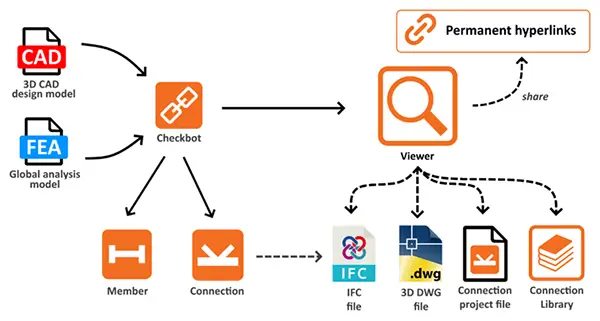
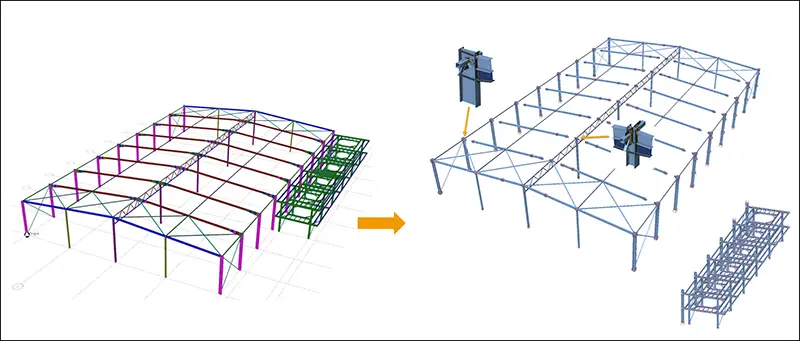
The webinar demonstrated how engineers can streamline steel connection design by linking SPACE GASS global analysis with IDEA StatiCa connection design.
Instead of manually rebuilding connection models, engineers can import, design, verify, and report within a connected environment, saving time while maintaining accuracy.
Whether you are new to IDEA StatiCa or already using SPACE GASS for structural analysis, the Checkbot integration provides a practical way to simplify steel connection design workflows.
Keep an eye out for a technical article explaining the Checkbot workflow in more detail, including step-by-step guidance on using the integration between SPACE GASS and IDEA StatiCa.
Follow our socials for upcoming events and updates.
IDEA StatiCa Steel – Classroom training
13-16 April 2026
Upcoming Software Updates
IDEA StatiCa v26 release expected next quarter.
AS3600:2018 compliance is now available in IDEA StatiCa Detail 3D.
Worked on something interesting using IDEA StatiCa? Get in touch if you would like your project featured.

Fill out the form below to get in contact with one of our sales experts, or call to chat with our team.
Tech Support: If you are looking for Product Tech Support please do not use this form. Please visit our Support Page to contact us for support questions.
AUTHORISED PARTNERS


COMPANY
LEGAL
ADDITIONAL
HELP
 Scroll to top